
Your WordPress SEO plugin choice shapes everything from how Google reads your site to how quickly it loads for visitors. With dozens of options claiming to be the best, narrowing the field takes more than reading a feature list.
This guide cuts through the noise and gives you a clear path to the right tool for your specific situation. For businesses that want more than a plugin setup, a dedicated SEO management approach tends to move the needle far faster than any tool alone.
Before comparing tools, it helps to agree on what "best" actually means in this context. The criteria below define each benchmark used throughout this SEO plugin comparison.
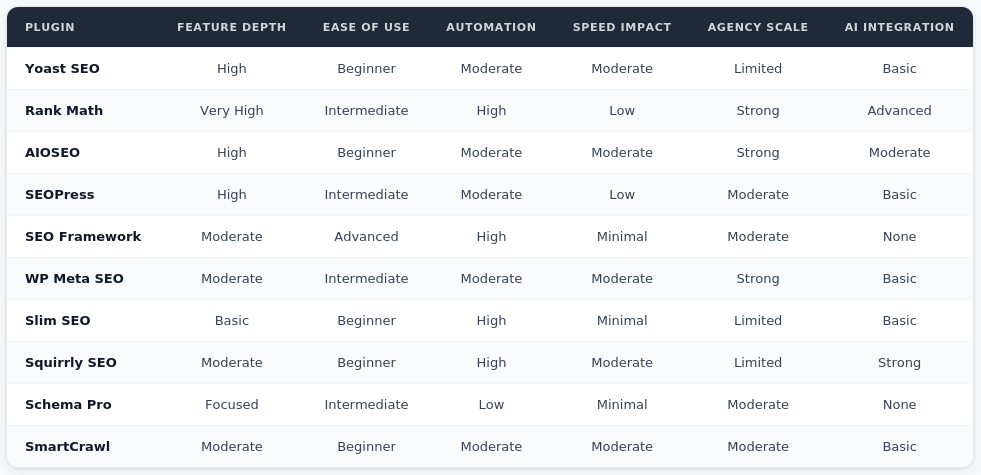
Here is how the top WordPress SEO plugins stack up across all six criteria.
These tools did not make the top 10 list, but each one solves a specific SEO problem that the major all-in-one plugins do not always handle as well.
.jpg)
Moving from one WordPress SEO plugin to another carries real risk when done carelessly. Most major plugins include data export tools that transfer meta titles, meta descriptions, and redirect rules, but manually auditing your settings before switching protects against gaps that automated imports miss.
Run a full site crawl before and after the migration to catch any broken XML sitemaps or missing schema markup before they affect your rankings. Treating the migration as a technical project rather than a quick swap reduces that risk considerably.
According to Search Engine Journal, one of the most consistent SEO setbacks during plugin migrations is losing custom redirect chains that were never properly documented in the first place.
Every SEO plugin adds something to your page load time and database. Lightweight options like Slim SEO and The SEO Framework contribute almost nothing measurable to front-end impact.
Heavier platforms like Yoast and Rank Math add more queries per page load but offset that with broader functionality. The right balance depends on your hosting environment and how aggressively your theme and other installed plugins are already affecting performance.
Running two full SEO plugins simultaneously is one of the most common and damaging mistakes WordPress site owners make. Conflicting XML sitemaps, duplicate schema markup output, or competing redirect manager rules will quietly undermine your SEO work without obvious error messages.
Keep one primary WordPress SEO plugin active and layer in focused micro-plugins only for features your main tool genuinely does not cover.
The best WordPress SEO plugins give your site the right infrastructure, but long-term rankings require an ongoing strategy behind them.
If you are ready to build a stronger foundation, book a meeting with the ReachGiant to talk through what optimized SEO looks like for your specific site.
What is the best WordPress SEO plugin for beginners? AIOSEO is consistently the top choice for beginners. Its guided setup, clean interface, and automated suggestions make it easy to manage WordPress SEO without a technical background.
Is Rank Math really free? Yes. Rank Math's free version includes schema markup, AI meta generation, XML sitemap support, and a redirect manager, making it one of the most feature-rich free SEO plugins available.
Can I run two SEO plugins at the same time? It is strongly advised against. Duplicate XML sitemaps, conflicting schema markup, and competing redirect rules can create SEO errors that are difficult to diagnose and fix.
What is schema markup and why does it matter? Schema markup is structured data added to your pages that helps Google display rich results in search. It can improve click-through rates by making your listings more informative and visually distinct.
Does Yoast SEO slow down my site? Yoast adds a moderate amount of database queries and front-end assets. For most sites on reliable hosting, the impact is manageable, but performance-first developers often prefer lighter alternatives like The SEO Framework.
What should I look for in an SEO plugin comparison? Focus on feature depth relative to your actual needs, site speed impact, ease of use, and whether the plugin supports your growth plans. Avoid choosing based on brand recognition alone.
Is SEOPress good for small businesses? Yes. SEOPress offers strong feature depth including content analysis, XML sitemaps, and redirect management at a significantly lower price point than most comparable SEO plugins for WordPress.
What is AI meta generation in an SEO plugin? AI meta generation automatically drafts SEO titles and meta descriptions based on your page content. Rank Math and Squirrly SEO offer the strongest implementations of this feature.
How do I migrate between WordPress SEO plugins safely? Export your existing meta data and redirect rules, install the new plugin, import the data, then run a full crawl to verify nothing was lost. Avoid running both plugins at the same time during the switch.
Do I need a separate plugin for internal linking? Most leading SEO plugins include some form of internal linking support. Yoast Premium and Rank Math both offer internal linking suggestions, though dedicated tools exist for sites with complex content architectures.


.png)





.png)