
Best WordPress SEO Plugins That Help Your Page Rank in 2026

February 2, 2026
Luke Griffin

Your WordPress SEO plugin choice shapes everything from how Google reads your site to how quickly it loads for visitors. With dozens of options claiming to be the best, narrowing the field takes more than reading a feature list.

This guide cuts through the noise and gives you a clear path to the right tool for your specific situation. For businesses that want more than a plugin setup, a dedicated SEO management approach tends to move the needle far faster than any tool alone.

What Separates a Great SEO Plugin From a Mediocre One

Before comparing tools, it helps to agree on what "best" actually means in this context. The criteria below define each benchmark used throughout this SEO plugin comparison.

  • Feature Depth - Covers the range of capabilities built in, including schema markup, XML sitemap generation, content analysis, and redirect manager functionality.
  • Ease of Use - Determines how quickly a non-developer gets meaningful results.
  • Automation - Reflects how much the plugin handles independently, including AI meta generation and automated suggestions.
  • Site Speed Impact - Measures the real-world load time and database footprint added to your pages.
  • Agency Scalability - Looks at whether the plugin can support multi-site or multi-client workflows.
  • AI Integration - Covers how well the plugin incorporates AI-driven content analysis into the writing and optimization process.

The Best WordPress SEO Plugins, Compared

Here is how the top WordPress SEO plugins stack up across all six criteria.
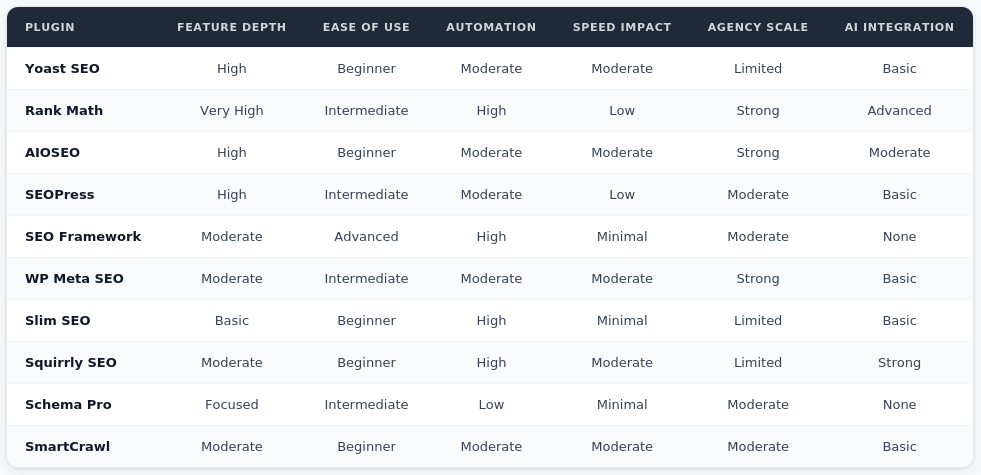
  1. Yoast SEO remains one of the most widely recognized SEO plugins for WordPress, particularly for its real-time content analysis and readability scoring. Its free SEO plugin version handles the basics well, though internal linking suggestions require the premium plan.
  2. Rank Math packs the deepest feature set of any best free SEO plugin in this comparison, bundling schema markup, AI meta generation, and redirect manager functionality into a free package. Technical users who want full control without a subscription will find it hard to beat on any WordPress SEO plugin comparison.
  3. AIOSEO earns its place as the top pick for ease of use, with guided setup and a clean dashboard that simplifies WordPress SEO for beginners. Its agency tier makes it a practical option for teams managing multiple client sites. Small businesses researching their digital marketing options often find the ReachGiant digital marketing helpful for understanding how plugin choices fit into a broader strategy.
  4. SEOPress delivers strong value for businesses that want feature depth without the premium cost, covering XML sitemaps, content analysis, and redirect management cleanly. For budget-conscious site owners, it is one of the most capable all-in-one SEO plugins for WordPress available.
  5. The SEO Framework is built for performance-focused developers who want automated SEO defaults and a minimal database footprint. There is no upselling inside the dashboard, which keeps the experience clean for those who already know what they are doing.
  6. Slim SEO automates the core WordPress SEO tasks completely, making it an ideal fit for simple sites that need a fast, hands-off solution. The trade-off is limited customization, so it works best when you do not need advanced controls.
  7. Squirrly SEO leads this group on AI integration, with a live assistant that guides keyword placement and content analysis directly inside the WordPress editor. It is the strongest pick for content creators who want AI-driven support throughout their writing process.
  8. Schema Pro is purpose-built for schema markup, giving it a narrow but powerful feature set for sites where structured data is the priority. It pairs well with a lightweight main SEO plugin that covers the broader on-page SEO fundamentals.
  9. SmartCrawl covers the core SEO plugins for WordPress bases with solid automated suggestions and a clean interface geared toward beginners. It integrates particularly well within the WPMU DEV hosting ecosystem.
  10. WP Meta SEO stands out for agency scalability, with a bulk editing interface that lets teams manage on-page SEO metadata across hundreds of pages efficiently. The ReachGiant web development team frequently evaluates plugin configurations as part of site performance audits.

Which Plugin Fits Your Situation

If You Are Use This Plugin
Beginner blogger AIOSEO
Advanced technical user Rank Math
Content-focused writer Yoast SEO
Performance-focused developer SEO Framework
Budget all-in-one SEOPress

More WordPress SEO Plugins Worth Knowing

These tools did not make the top 10 list, but each one solves a specific SEO problem that the major all-in-one plugins do not always handle as well.
  1. Redirection is the go-to standalone plugin for managing 301 redirects and monitoring 404 errors, making it a practical addition for sites that do not use Rank Math or AIOSEO's built-in redirect tools.
  2. Broken Link Checker scans your entire site for dead internal and external links and lets you fix them directly from the dashboard, keeping your site clean without manually auditing every post.
  3. MonsterInsights brings Google Analytics data into your WordPress dashboard in a readable format, making it easier to connect SEO performance to actual traffic behavior without leaving the admin panel.
  4. Google Site Kit is Google's own WordPress plugin, pulling data from Search Console, Analytics, and PageSpeed Insights into a single dashboard for a clean overview of how your site performs across Google's tools.
  5. Link Whisper automates internal linking by suggesting relevant links as you write, which is particularly useful for content-heavy sites where manual internal linking becomes difficult to scale.
  6. Ahrefs SEO brings Ahrefs' backlink and audit data directly into WordPress, giving advanced users access to competitive keyword and link data without switching between tools.
  7. ShortPixel handles image compression and optimization, which directly supports page speed and Core Web Vitals scores without requiring a separate performance plugin for images.
  8. Internal Link Juicer takes a more automated approach to internal linking than Link Whisper, using keyword rules to insert links across your existing content library without manual intervention.
  9. Imagify is a lightweight image optimization plugin that integrates cleanly with most WordPress setups, making it a strong alternative to ShortPixel for teams that prefer a simpler interface.
  10. Structured Content focuses specifically on JSON-LD schema markup, allowing developers to add structured data without relying on an all-in-one plugin's schema output.

Switching Plugins Without Losing Ground

Moving from one WordPress SEO plugin to another carries real risk when done carelessly. Most major plugins include data export tools that transfer meta titles, meta descriptions, and redirect rules, but manually auditing your settings before switching protects against gaps that automated imports miss.

Run a full site crawl before and after the migration to catch any broken XML sitemaps or missing schema markup before they affect your rankings. Treating the migration as a technical project rather than a quick swap reduces that risk considerably.

According to Search Engine Journal, one of the most consistent SEO setbacks during plugin migrations is losing custom redirect chains that were never properly documented in the first place. 

How Plugins Affect Your Site's Performance

Every SEO plugin adds something to your page load time and database. Lightweight options like Slim SEO and The SEO Framework contribute almost nothing measurable to front-end impact.

Heavier platforms like Yoast and Rank Math add more queries per page load but offset that with broader functionality. The right balance depends on your hosting environment and how aggressively your theme and other installed plugins are already affecting performance.

The Plugin Stacking Mistake Most Sites Make

Running two full SEO plugins simultaneously is one of the most common and damaging mistakes WordPress site owners make. Conflicting XML sitemaps, duplicate schema markup output, or competing redirect manager rules will quietly undermine your SEO work without obvious error messages.

Keep one primary WordPress SEO plugin active and layer in focused micro-plugins only for features your main tool genuinely does not cover.

The Right Plugin Is Only Half the Work

The best WordPress SEO plugins give your site the right infrastructure, but long-term rankings require an ongoing strategy behind them.

If you are ready to build a stronger foundation, book a meeting with the ReachGiant to talk through what optimized SEO looks like for your specific site.

Frequently Asked Questions

What is the best WordPress SEO plugin for beginners? AIOSEO is consistently the top choice for beginners. Its guided setup, clean interface, and automated suggestions make it easy to manage WordPress SEO without a technical background.

Is Rank Math really free? Yes. Rank Math's free version includes schema markup, AI meta generation, XML sitemap support, and a redirect manager, making it one of the most feature-rich free SEO plugins available.

Can I run two SEO plugins at the same time? It is strongly advised against. Duplicate XML sitemaps, conflicting schema markup, and competing redirect rules can create SEO errors that are difficult to diagnose and fix.

What is schema markup and why does it matter? Schema markup is structured data added to your pages that helps Google display rich results in search. It can improve click-through rates by making your listings more informative and visually distinct.

Does Yoast SEO slow down my site? Yoast adds a moderate amount of database queries and front-end assets. For most sites on reliable hosting, the impact is manageable, but performance-first developers often prefer lighter alternatives like The SEO Framework.

What should I look for in an SEO plugin comparison? Focus on feature depth relative to your actual needs, site speed impact, ease of use, and whether the plugin supports your growth plans. Avoid choosing based on brand recognition alone.

Is SEOPress good for small businesses? Yes. SEOPress offers strong feature depth including content analysis, XML sitemaps, and redirect management at a significantly lower price point than most comparable SEO plugins for WordPress.

What is AI meta generation in an SEO plugin? AI meta generation automatically drafts SEO titles and meta descriptions based on your page content. Rank Math and Squirrly SEO offer the strongest implementations of this feature.

How do I migrate between WordPress SEO plugins safely? Export your existing meta data and redirect rules, install the new plugin, import the data, then run a full crawl to verify nothing was lost. Avoid running both plugins at the same time during the switch.

Do I need a separate plugin for internal linking? Most leading SEO plugins include some form of internal linking support. Yoast Premium and Rank Math both offer internal linking suggestions, though dedicated tools exist for sites with complex content architectures.

You may also like

How to Create a Social Media Strategy Without the Guesswork

March 12, 2026
by Luke Griffin
Read article

How to Conduct a Technical SEO Site Audit (And What to Fix First)

March 11, 2026
by Luke Griffin
Read article

How to Make a Website for My Business?

March 11, 2026
by Luke Griffin
Read article